


 (877) 897-1725


Table Of Contents
Table Of Contents
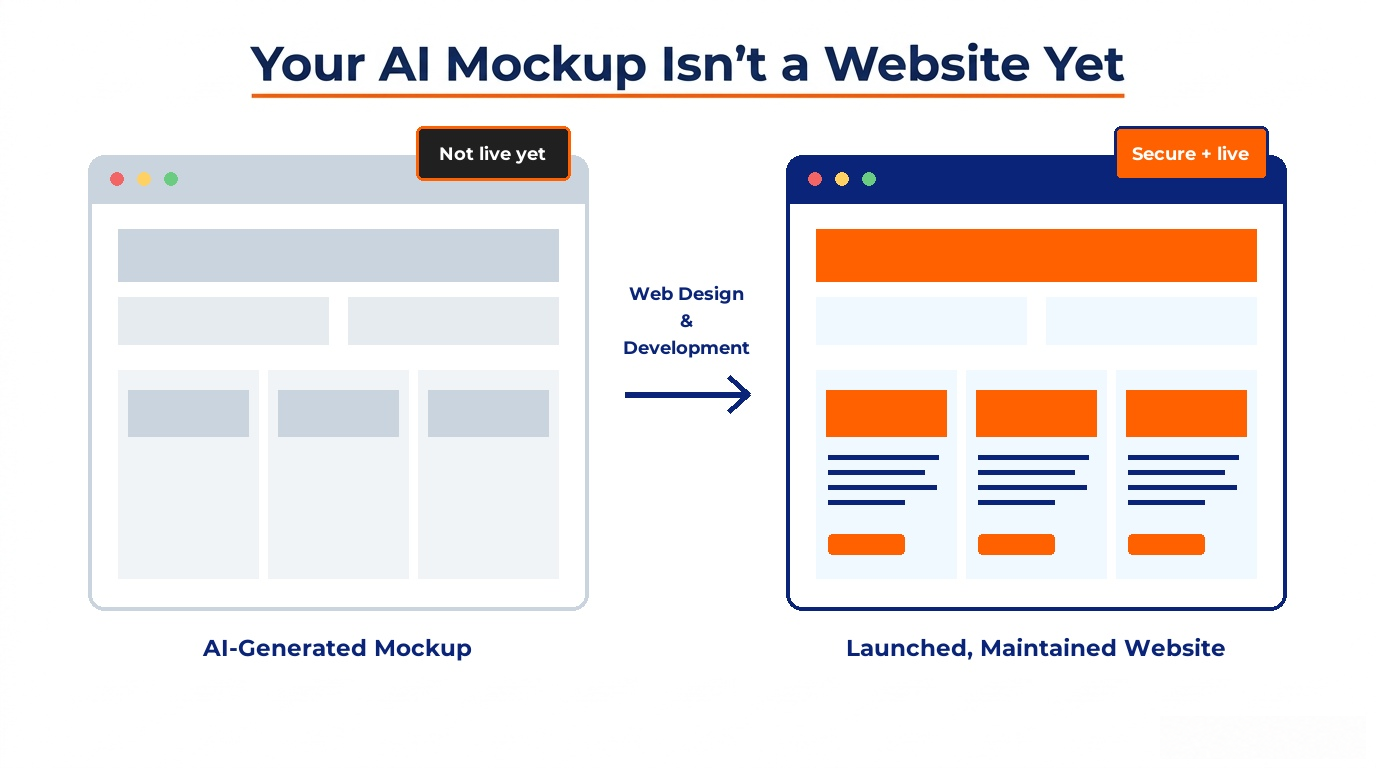
Somewhere in the last year, "build me a website" became a prompt instead of a project. Type a sentence into ChatGPT, Claude, v0, or Figma Make, and in under a minute you're looking at a homepage, hero section, nav bar, a few content blocks, maybe even a color palette that doesn't clash. It's genuinely impressive, and it's free.
Then comes the question almost everyone asks next: now what? Do you publish this? Hand it to a developer? Is it even safe to put online as-is?
Here's the honest answer: what you're holding is a mockup, not a website. That's not a knock on the tool, it did exactly what it was built to do. But there's a real gap between "this looks like a finished site" and "this is a secure, functioning, properly built website," and almost nobody walks through what's actually in that gap. This article does.
What AI Mockup Tools Actually Produce
Direct answer: Most AI website tools, whether that's a general assistant like ChatGPT or Claude producing an HTML file, or a dedicated design tool like Figma Make, v0, or Framer AI, generate a visual and structural starting point: layout, styling, placeholder content, and sometimes working front-end code. What they don't reliably produce is a production-ready site with a secure backend, real hosting, and the infrastructure to keep running.
It's worth separating two categories here, because they get conflated constantly:
- Pure mockup tools (Figma Make, Uizard, Canva's mockup generator, a plain HTML file from ChatGPT or Claude) are built for visualizing an idea, showing a client, a boss, or yourself what a layout could look like before committing to it.
- Full AI app builders (Lovable, Bolt, Replit Agent, and similar "vibe coding" platforms) go further and actually generate working, deployable code with a connected database which sounds like it closes the gap, but as covered below, that code comes with its own well-documented security track record.
Either way, what lands in your hands is a draft. A strong one, often. But a draft.
Why "It Looks Done" Isn't the Same as "It's Launch-Ready"
This is the part that trips people up, and it's worth saying plainly: a polished-looking homepage and a launch-ready website are not the same achievement. Visual design is maybe a third of what makes a site work. The rest is infrastructure most visitors never think about until it fails.
A mockup can look completely finished and still have no working contact form, no SSL certificate, no way to recover if something breaks, and no plan for what happens when a browser update, a plugin conflict, or a security patch is needed six months from now. None of that shows up when you're just looking at the screen.
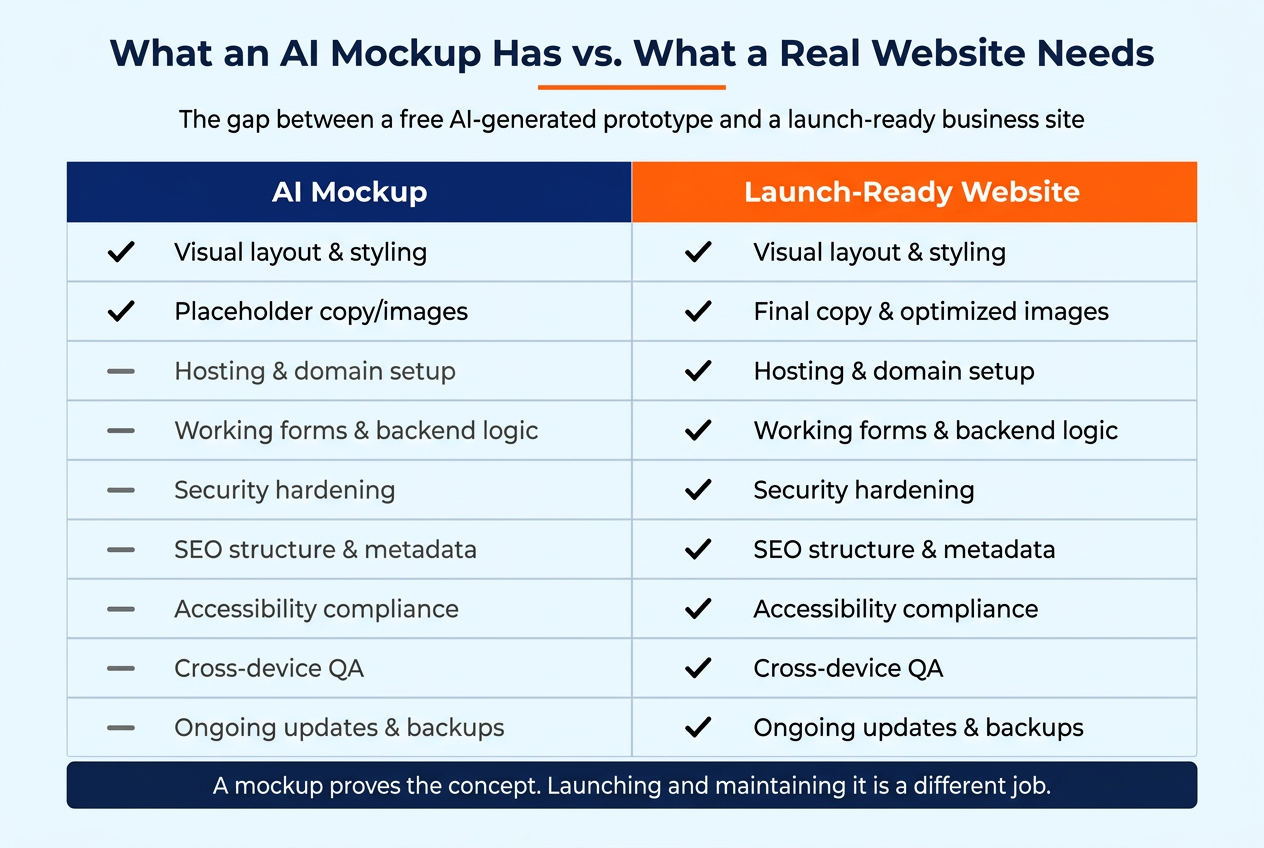
The 8 Things Missing From Most AI-Generated Mockups
1. Real hosting and a working domain
A mockup usually lives in a preview environment or a downloaded file. Getting it onto the open internet with a real domain, proper DNS configuration, and reliable hosting is a separate technical step most AI tools don't fully handle for you and the ones that do (the full app builders) typically host it on their own platform, which creates lock-in if you ever want to move.
2. Functional backend logic
Contact forms that actually send email. Booking systems that check availability. Payment processing that doesn't silently fail. These require backend code connected to real services, not placeholder buttons that look clickable in a prototype.
3. Security hardening
This is the one with the most evidence behind it, and it gets its own section below. Short version: AI-generated code has a well-documented pattern of shipping with security gaps that aren't visible just by looking at the page.
4. SEO structure
A mockup rarely includes proper title tags, meta descriptions, header hierarchy, schema markup, or a sitemap. the structural layer that helps Google (and now AI search systems) actually understand and rank the page. Our guide on why businesses without blogs will struggle in the AI search era covers the broader visibility problem a site faces without this kind of structure in place.
5. Accessibility
Color contrast, keyboard navigation, screen-reader support, proper alt text, these are legal and ethical requirements in many contexts, not nice-to-haves, and AI mockup generators don't reliably account for them. We go deeper on this in how to master accessibility in web design.
6. Cross-device and cross-browser QA
A layout that looks right in the tool's preview pane can break on an older phone browser, a specific screen width, or a non-Chrome browser. Someone has to actually test it across real devices before it goes live.
7. Content that's actually yours
AI-generated placeholder copy is generic by design, it has to be, since the tool doesn't know your business yet. Real launch copy needs to reflect your actual services, voice, and offers, which is a separate writing pass, not a styling one.
8. A plan for what happens after launch
This is the piece almost nobody brings up, and it's the subject of its own section further down: a website is not a one-time deliverable. It needs attention for as long as it's live.
What the Data Says About AI-Generated Code and Security
Direct answer: Independent testing has repeatedly found that AI-generated code introduces security vulnerabilities in roughly 40–45% of cases, and this rate has not meaningfully improved as models have gotten more capable, meaning a polished-looking AI-built site can still carry real, exploitable weaknesses underneath.
Veracode, an application security company, has tracked this directly. Its 2026 GenAI Code Security Report tested more than 100 large language models and found that roughly 44% of AI code-generation tasks introduced a known security vulnerability, with the average security pass rate sitting at 56% barely moved from 55% the year before. The report's own framing is blunt: syntax is solved, security is not. Models now write code that compiles and runs correctly almost every time; whether that code is safe is a different, much less solved problem. Performance also varies sharply by vulnerability type, the same research found models handled SQL injection reasonably well (an 83% pass rate) but failed badly on cross-site scripting and log injection, the kinds of flaws that depend on understanding how data moves through an application rather than following a memorized pattern.
This isn't a theoretical risk. In February 2026, a researcher testing an AI-built EdTech application — one Lovable had featured on its own site as a success story, found 16 vulnerabilities, six of them critical, including a broken authorization flaw that exposed 18,697 user records without requiring any login, according to reporting from The Register. The underlying issue wasn't exotic: a missing check on who was allowed to access which data, a basic control that's easy to skip when nobody is specifically reviewing for it.
None of this means AI coding tools are unusable, or that the people who build them are careless. It means the output needs the same scrutiny any code would get before it handles real customer data and that scrutiny is exactly the step an AI mockup, by itself, doesn't include.
What Professional Web Design and Development Adds to a Mockup
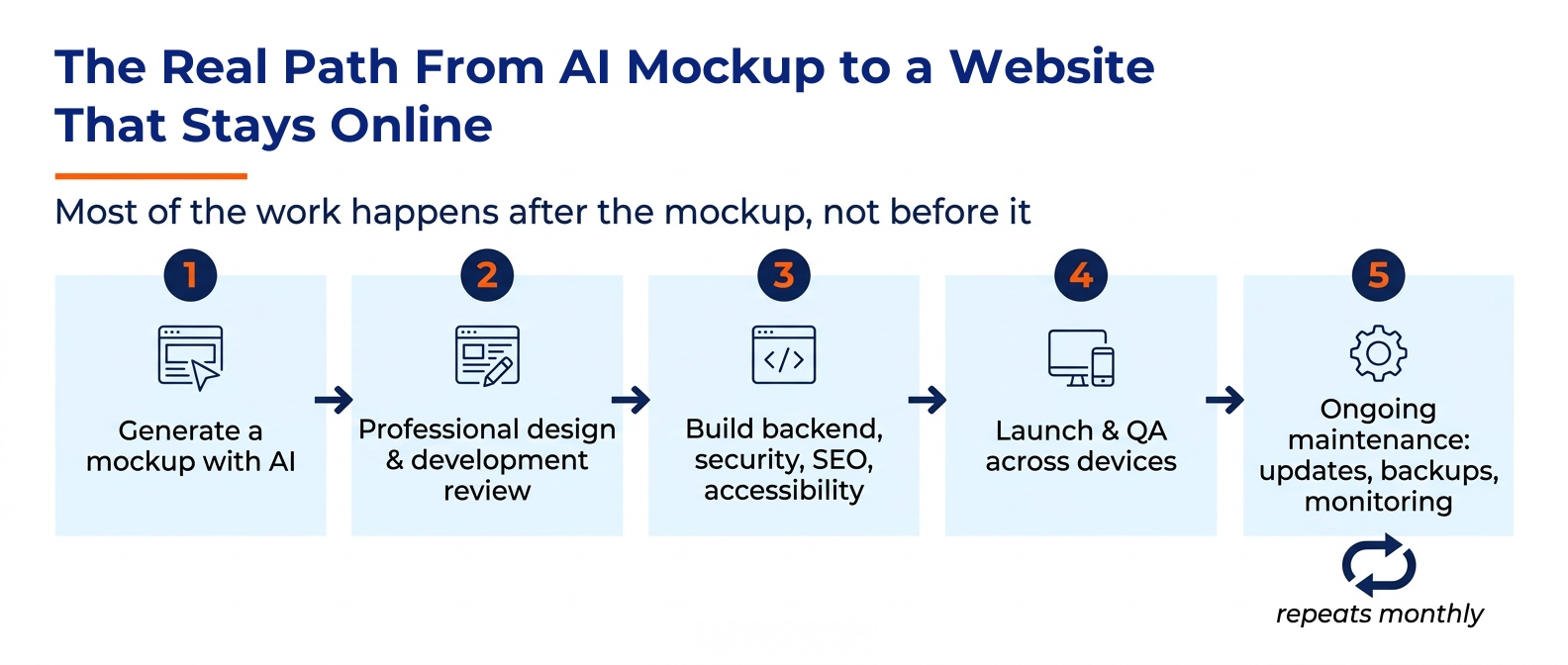
A mockup answers "what could this look like?" Professional development answers "how does this actually work, safely, for real visitors?" In practice, that means:
- Translating the design into properly structured, secure code rather than shipping whatever the AI tool generated, a developer reviews it, hardens authentication and data handling, and fixes the kinds of gaps the Veracode research above consistently finds.
- Setting up real infrastructure hosting, SSL, domain configuration, backups, and a CMS you can actually log into and update without touching code.
- Building the parts that have to function correctly forms, bookings, payment flows, anything where "looks right" and "works right" are different bars entirely.
- Handling SEO and accessibility structure from the start, rather than bolting it on after the fact, which is almost always more work.
- Testing across real devices and browsers before anything goes live, not after a customer reports something broken.
If you're choosing who does this work, the considerations are largely the same ones that mattered before AI mockups existed, just applied to a different starting point. Our post on factors to consider when choosing a web development company covers how to evaluate a potential partner, and it's just as relevant whether you're starting from a blank page or an AI-generated draft.
The Maintenance Gap Nobody Mentions
Here's the part that gets skipped in almost every "AI vs. professional web design" comparison: launching a website is not the finish line. It's the start of an ongoing responsibility, and that responsibility doesn't change based on how the site was originally built.
A few things happen on a predictable, recurring basis once a site is live:
- Software needs patching CMS platforms, plugins, and underlying frameworks release security updates regularly. Skipping them is one of the most common ways sites get compromised, regardless of whether the original code came from a developer or an AI tool.
- Backups need to actually exist and be tested A hosting plan without a verified backup routine means one bad update or one hack away from losing the site entirely.
- Uptime and performance need monitoring A site that's slow, down, or throwing errors costs you customers before you even know there's a problem.
- Content goes stale Hours change, prices change, services change — and an unmaintained site quietly becomes inaccurate.
- New vulnerabilities get discovered after launch , in the platform, in a plugin, or in a third-party integration you didn't write and don't control.
None of this is specific to AI-built sites, it's true of every website. But it matters more here for a specific reason: a site built from an AI mockup often skips the step where someone sets up a maintenance plan in the first place, because the whole process felt "done" the moment it looked finished. Our piece on factors to consider when choosing a web development company touches on this too, support and maintenance should be part of the conversation from day one, not an afterthought once something breaks.
If your current site has been sitting untouched for a while, AI-built or otherwise it's worth reading when it's time to redesign your website alongside this one, since an aging, unmaintained site and a freshly AI-mocked-up one can end up with surprisingly similar problems.
When an AI Mockup Is Genuinely Enough
To be fair to the tools: not every situation needs the full build-out described above.
- Testing an idea before committing budget — showing investors, partners, or yourself what a concept could look like.
- A short-lived landing page for a single event or campaign with no sensitive data collection involved.
- Internal prototypes that never face the public internet at all.
In these cases, the speed and cost of an AI mockup are a genuine advantage, and there's no reason to over-engineer something that doesn't need it.
A Simple Decision Framework
Ask these two questions about what the site needs to do:
- Will it collect, store, or process any real customer data names, emails, payments, bookings, account logins? If yes, the security gap covered above stops being optional to address.
- Does it need to work reliably for months or years, representing your business to customers who are judging you by it? If yes, it needs the infrastructure, SEO, and maintenance plan a mockup doesn't include on its own.
If the honest answer to either is yes, the mockup is a draft worth keeping as a starting point for a proper build, not as the finished product.
Common Mistakes Businesses Make With AI-Generated Sites
- Publishing the mockup as-is because it "looks professional." Visual polish and technical soundness are unrelated; one doesn't imply the other.
- Assuming a platform's built-in security scan is a guarantee. Several AI builders run automated checks before publishing, but flagging an issue and someone actually fixing it correctly are two different things and the Lovable example above shows what happens when that gap goes unaddressed.
- Skipping SEO structure entirely , then wondering months later why the site isn't getting found. Retrofitting SEO onto an existing site is almost always more work than building it in from the start.
- Treating launch as the end of the project , with no plan for updates, backups, or monitoring, the maintenance gap covered above.
- Not budgeting time or money for the "boring half" hosting, security, accessibility — because the visible, exciting part (the design) already feels finished.
Frequently Asked Questions
Can AI build my whole website?
AI tools can generate a working front-end and, with full app builders, a connected backend. Whether that output is secure and launch-ready without review is a separate question — testing has found AI-generated code introduces vulnerabilities in roughly 40–45% of cases, so review before launch matters regardless of which tool you use.
Is it safe to launch an AI-generated website without review?
Not without a security review first. Industry testing consistently finds meaningful vulnerability rates in AI-generated code, and at least one documented real-world incident exposed tens of thousands of user records through a flaw in an AI-built application.
What's the difference between an AI mockup and a real website?
A mockup shows layout and styling. A real, launch-ready website also needs working hosting, a secure backend, SEO structure, accessibility compliance, cross-device testing, and a maintenance plan — none of which a mockup includes by default.
Do AI-built websites need ongoing maintenance?
Yes. Software patches, backups, uptime monitoring, and content updates are an ongoing requirement for any website, regardless of how it was originally built.
How much does it cost to turn an AI mockup into a real website?
This varies significantly by scope and complexity. A simple informational site is a smaller project than one with e-commerce, bookings, or custom functionality; it's worth getting a specific quote based on what the mockup includes.
Can I just use the free AI website builder and skip hiring a developer?
For a low-stakes, short-lived project with no sensitive data, often yes. For a site that handles customer information or represents your business long-term, the security and maintenance considerations above make a stronger case for professional review before launch.
Why did my AI-built site break after a few months?
Most commonly this traces back to a missed software update, an expired certificate, or a third-party service change that nobody was monitoring for — exactly the kind of thing an ongoing maintenance plan is built to catch.
Do AI website builders hurt SEO?
They can. Generic metadata, repetitive page structures across templated outputs, and missing technical SEO elements are common limitations unless someone specifically builds that structure in.
Is AI-generated code actually less secure than code written by a developer?
Independent testing (Veracode's 2026 report) found AI models pass secure-coding tests at roughly a 56% rate on average, with wide variation by task type — not a guarantee of insecurity, but not a guarantee of safety either. The practical takeaway is that AI-generated code needs the same review process any code would get before handling real data.
Final Thoughts
An AI mockup is a genuinely useful starting point, faster and cheaper than starting from a blank page, and a fair way to pressure-test an idea before committing real budget to it. The mistake isn't using one. It's assuming that because it looks finished, it is finished.
The honest version of this article's advice is simple: treat the mockup as your first draft, not your final deliverable. Everything from hosting and security to SEO structure and an actual maintenance plan still needs to happen before that draft becomes a website customers can trust.
If you've got an AI-generated mockup sitting in a file somewhere and you're not sure what to do with it, Content Development Pros' Web Design & Development team can take it from there, reviewing what's usable, building out what's missing, and getting it properly launched. And once it's live, our Website Maintenance service handles the part that comes after launch: updates, backups, security monitoring, and keeping the site actually running the way it did on day one.
Contact CDP Today!
Ready to talk to one of our web copy experts?

By: Adam Meyers
Adam Meyers is a content and business strategist at Content Development Pros, where he works with businesses to develop clear, engaging, and purposeful content that connects with their audiences. His work spans business, technology, digital marketing, branding, and emerging industry trends.


